
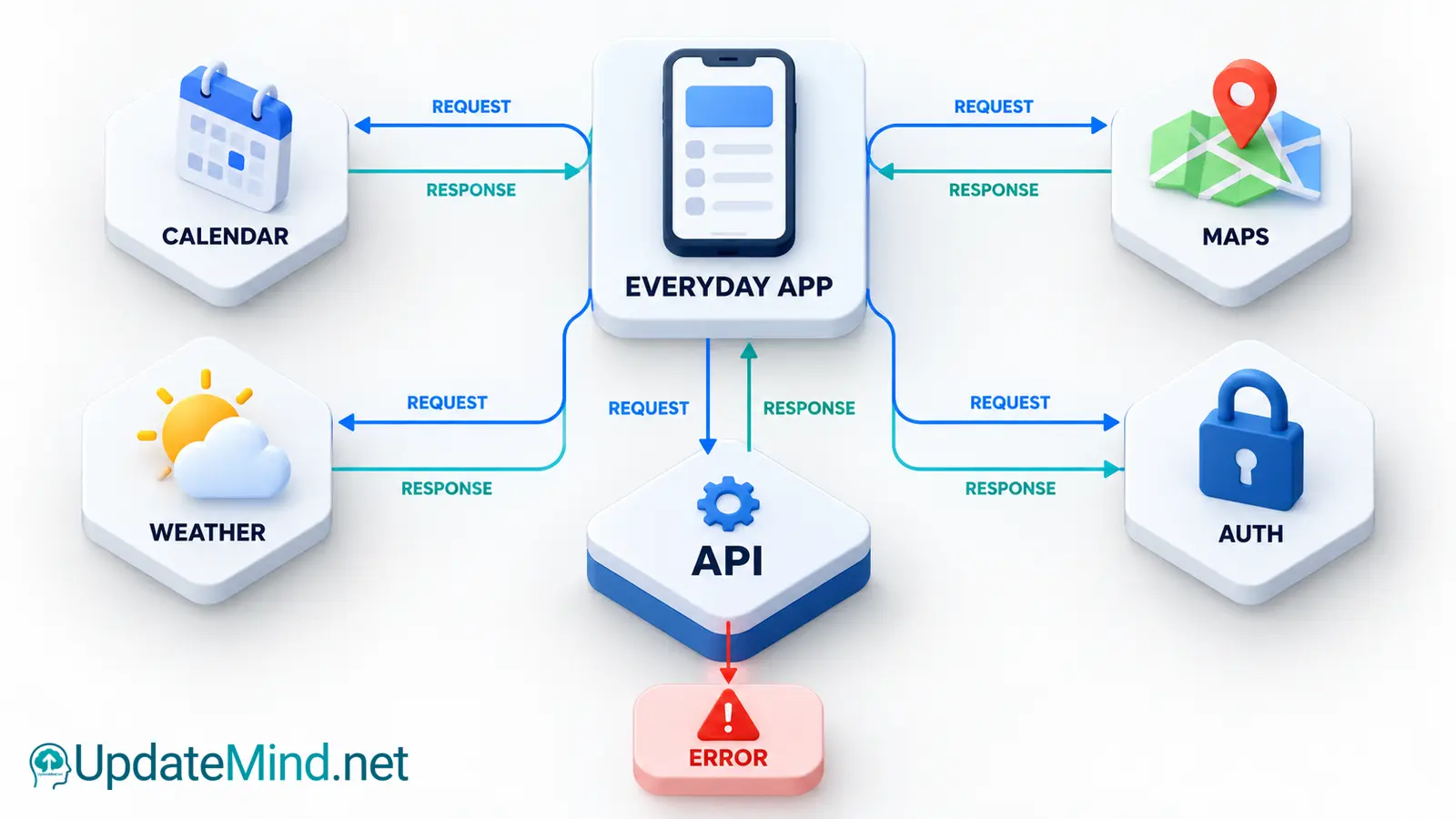
When one app shows information from another service, an API is often the connection between them. An API, or application programming interface, is a defined way for software to request data or ask another system to perform an action. You do not need to be a developer to understand the basic idea: one system makes a request, another system checks it, and a response comes back.
This explains many everyday features, such as a calendar that displays public holidays, a travel app that shows a map, or a shop that confirms a payment. The apps do not usually share their entire databases. They exchange specific information through rules that both sides understand.
The basic API conversation
A typical web API conversation has four parts:
- The client is the app or service making the request.
- The endpoint is the address for a particular kind of resource or action.
- The request contains details such as the method, parameters, headers and sometimes a body.
- The response contains a status code, headers and often data such as JSON.
For example, a weather app might request the forecast for a location. The service receives the request, checks whether it is valid and authorized, then returns a response. A successful response might include temperatures and times in JSON. The app reads those values and turns them into the screen you see.
The API is a contract. It describes what can be requested, which information is required, what the response looks like and what errors may mean. If either side changes the contract without warning, the connection can break.
Requests: method, address and data
Web APIs commonly use HTTP request methods. GET is generally used to retrieve information. POST is commonly used to submit data or ask a service to create something. PUT and PATCH are used for updates in different API designs, while DELETE is used to remove a resource. The exact behavior belongs to the API’s documentation, so the method name alone is not enough to understand a request.
The endpoint identifies the resource or operation. A request may also include query parameters, such as a location, date range or page number. Headers can describe the format the client accepts or provide authorization information. A request body carries submitted data when the operation needs it.
Good documentation should show a complete example, explain required fields and say whether a request can safely be repeated. This matters when an app retries after a network interruption. Repeating a read request is different from repeating a payment or account change.
Responses and status codes
An API response usually includes a status code that gives the client a broad result. Codes in the 200 range indicate success, 300 range codes relate to redirection, 400 range codes indicate a problem with the request or permission, and 500 range codes indicate a server-side problem.
A 200 response often means that a request succeeded. A 201 response is commonly used when a resource was created. A 400 response can mean that submitted information is invalid. A 401 response usually means that authentication is missing or invalid, while 403 means the request is understood but not allowed. A 404 response means the requested resource was not found. A 429 response can indicate that the client has sent too many requests in a given period.
The status code is only part of the answer. A useful error response may include a machine-readable code and a human-readable explanation. Apps should handle errors deliberately: show a clear message, avoid exposing secret details and retry only when the error is likely to be temporary.
Why APIs often use JSON
Many web APIs return JSON because it is a compact text format that represents objects, lists, numbers, text and true-or-false values. A response might represent a user with fields such as name and preferred language, or a list of products with prices and availability.
JSON is easy for software to parse, but it is still important to validate what arrives. A field can be missing, have a different type or contain an unexpected value. A robust app checks the response before displaying it or using it in a calculation.
The browser Fetch API is one common way for web code to make a request. A fetch call returns a Response object, and the program can inspect its status before reading the body as JSON. A response that is not successful can still contain a body, so checking the status is part of responsible error handling.
Authentication and authorization
Authentication answers “who is making this request?” Authorization answers “what is that requester allowed to do?” APIs often use API keys, access tokens or OAuth-based flows. The exact choice depends on the service and the sensitivity of the data.
An API key may identify an application or project, but it should not automatically be treated as proof that a person is allowed to read private information. Access tokens usually carry more specific permissions and may expire. OAuth lets a person grant an application limited access without giving that application their password.
Keep credentials out of public code, screenshots and version control. Use the smallest permission scope that supports the task, rotate credentials when exposure is suspected and follow the service’s current security guidance. Never ask a user to paste a secret into an untrusted form just to make an integration work.
Rate limits, reliability and cost
An API may limit how many requests a client can make in a time period. Limits protect the service and help it remain available for other users. Some services also charge by request, by returned records or by the amount of data transferred.
A well-designed client avoids unnecessary calls. It can cache data that does not change often, request only the fields it needs, paginate through large results and respect a server’s retry guidance. If a service returns a rate-limit response, repeatedly sending the same request immediately can make the problem worse.
Reliability also depends on timeouts, retries and partial failure. A user may have a working internet connection while one external service is unavailable. The app should explain what happened and preserve unsent work where possible. It should not silently show old information as if it were current.
APIs in a real everyday example
Imagine a food delivery app. It may use one API for restaurant listings, another for maps and delivery distances, and another for payment processing. The app sends only the information each service needs. The map service does not need the user’s payment details, and the payment service does not need the full restaurant catalogue.
When you place an order, the app may create an order record, request a payment authorization and ask a delivery service to estimate a route. Each step can succeed or fail independently. The app therefore needs clear states such as pending, confirmed, failed or cancelled.
This separation makes systems easier to change, but it also creates dependencies. If a provider changes its API, reaches a rate limit or returns incomplete data, the app must handle that case. Good integrations monitor these dependencies and document what happens when a response is delayed or unavailable.
How to evaluate an API or integration
Before connecting an app to a service, check:
- What data does the service collect, return or store?
- Which permissions does the integration request?
- Are authentication, rate limits and pricing documented?
- How are errors, outages and version changes communicated?
- Can access be revoked and credentials rotated?
- Does the service provide a test environment or sandbox?
- Is the data accurate, current and appropriate for the decision you want to make?
Read the provider’s current documentation because endpoints, limits, pricing and authentication rules can change. Test with non-sensitive data first. If the integration will handle personal, financial or health information, review the provider’s terms and security documentation carefully.
Common API mistakes
A common mistake is assuming that a successful HTTP response means the business operation succeeded. A request can receive a technically valid response that contains a declined payment, an empty result or a warning that the app still needs to handle.
Another mistake is putting a secret key in browser code or a public repository. Anything sent to a user’s browser should be treated as visible to that user. Sensitive calls usually belong on a controlled server, with access limited and logged appropriately.
It is also easy to depend on undocumented behavior. If an integration relies on a field, endpoint or response shape that the provider has not promised, it can break without notice. Use documented features and record the API version where the service provides versioning.
Frequently asked questions
Is an API the same as an app?
No. An app is a user-facing program or service. An API is an interface that lets software interact with a system through defined rules. An app can use several APIs, and an API can serve many different apps.
Do all APIs use the web?
No. APIs can exist inside an operating system, a software library, a database or a device. Web APIs are common because HTTP works across many platforms.
Is JSON an API?
No. JSON is a data format. An API may use JSON for requests and responses, but the API also includes the endpoints, methods, authentication rules, limits and expected behavior.
Why did an API request fail?
The request may be malformed, unauthenticated, unauthorized, rate-limited or aimed at a resource that no longer exists. The status code and documented error details are the best starting points. If the service is experiencing an outage, the client may need to wait and retry safely.
APIs are the agreements that let separate systems work together. Once you understand the request, response, permissions and failure cases, everyday integrations become easier to evaluate. Start with the provider’s current documentation, request only what you need and design for the moment when an external service is slow, changed or unavailable.